
Cross Stitch Apps Compared: What to Look For in 2026
We make one of the tools in this space, so read this knowing that. We have tried to be straight about where other tools are better, because a comparison where the author wins every round is not worth anybody's time. Prices and features move, so check anything that matters to you before buying. This was written in July 2026 and updated in September 2026.
First, work out which job you need doing
Most disappointment comes from buying a tool for the wrong job. There are five, and few tools do more than one of them.
- Getting hold of charts. Where the designs come from before any of the rest applies.
- Marking off a chart you already own. You have a PDF and want to track what you have stitched.
- Designing or editing a chart. Drawing from scratch, or fixing one you have.
- Converting a photo. Turning an image into a stitchable chart.
- Tracking projects. Which pieces are on the go, how far through, how many hours.
Where the charts come from
Almost every tool below assumes you already have a chart, which quietly leaves the first job to you. The usual answer is buying designs one at a time from a designer or a marketplace.
Pattern clubs are the subscription version of that. The Pattern Club, Geeky Stitching Club, Stitch People Club, Caterpillar and Fat Quarter Shop all run one, and the shape is much the same: pay monthly, get that month's designs, and in some cases reach a back catalogue while you stay subscribed. If you mostly want a steady supply of things to stitch, this is the category to look at, and it is a better fit for that than any markup app.
Two things are worth knowing before you compare one with a subscription like ours. A club sells you charts and stops there, so you still need something to mark them off with. And the chart you are sent is the chart you get, as a finished PDF, so changing a name, a date or a colour is not on offer.
Chart markup
This is the biggest category and the one most people start with.
Pattern Keeper is the reference point. It opens PDF charts, marks off stitches quickly, and has a large and enthusiastic user base. It is genuinely very good at the one job it does, and if you stitch on Android from charts made of full crosses, it remains the one to beat.
Three limits are worth knowing before you choose it, all taken from its own FAQ and checked again in September 2026. It "currently only supports full cross stitches", with backstitch and fractional stitches on the wish list, so outlining and quarter stitches are not tracked. It is Android only, with the iOS question answered "No not yet. We are working on it!", which is why "Pattern Keeper for iPad" is such a common search. And it "doesn't have automatic sync": moving a project between your phone and your tablet means exporting it from one device and importing it on the other.
None of that makes it a bad app. It makes it a very good tracker for a particular kind of chart on a particular platform, and if that is what you have, buy it.
Markup R-XP is the one to look at if those limits rule Pattern Keeper out. It runs on iOS and Android, phones and tablets, and marks off backstitch, fractional stitches and blackwork as well as full crosses. It is a yearly subscription, charged well below ours, after a two-week trial. Like Pattern Keeper it marks up a chart you already have rather than making one, and moving to another device is a backup and restore rather than continuous sync.
Stitchwork is the strongest of the newer Apple apps, and for marking off alone it is a serious answer. It reads vector and scanned PDFs as well as OXS files, marks off half, quarter and three-quarter stitches and backstitch outlines, syncs stitch by stitch through your own iCloud, and keeps a floss stash with a shopping list across projects. It is a single payment rather than a subscription. It runs on iPhone, iPad and Apple silicon Macs only, so its sync will not reach an Android tablet.
StitchTracker is free and also syncs through iCloud, but it opens OXS files only. If your charts arrive as PDFs, which most bought ones do, it cannot help.
Cross Stitch Markup is another option on iOS.
Browser-based trackers, including ours, sidestep the platform question entirely because they run anywhere with a browser.
Opening a PDF chart is the part worth testing before you commit to any of them. Ask what happens to backstitch, whether a chart split across several pages comes back as one grid, and what it does with a PDF that has no legend. Ours recovers backstitch from the drawn lines rather than discarding it, reassembles tiled charts, and builds a working palette by matching the chart's colours to the nearest threads when the file carries no key at all.
Design and editing
MacStitch and WinStitch are long-established desktop charting software with a deep feature set, including backstitch, knots, beads and fractional stitches. If you want maximum control and you work at a desk, this category is mature and well understood.
PCStitch is the other long-standing name, and the reason .pat files turn up so often.
Browser editors are newer. The advantage is nothing to install and the same chart on every device. The thing to test is whether editing genuinely works on a touchscreen rather than being a desktop tool with a phone-shaped skin.
Photo conversion
Almost everything converts photos now, and the quality gap is narrower than the marketing suggests. What actually differentiates them:
- Whether you control the colour count
- Whether you can remove the background first
- Whether the palette maps to real thread numbers
- How much confetti the output contains
FlossCross is free and deliberately simple, which is exactly right for a quick conversion. Xstitchify and Stitchmate both offer conversion alongside editing and export, with different pricing models. Stitchmate has a free editor and charges per chart you export, or for a pass, rather than by subscription, which suits occasional use well.
Where HobbyTub is strong
It is a pattern library with the marking off built in. That is the honest headline, and it matters more than any single feature below. The library is unlimited use: stitch any design in it as many times as you like, for as long as you subscribe, and new designs are added every week. Then mark them off stitch by stitch in the same place, on whatever device you pick up. A club gives you the first half of that and a markup app the second.
Being specific about the rest:
- It runs everywhere, because it is a browser based cross stitch app. iPad, iPhone, Android, Chromebook and desktop get the same thing, and the editor works on a phone rather than only the chart viewer.
- Backstitch, French knots and beads are marked off too, not just full crosses, so an outlined design is tracked as the chart actually is rather than only the parts of it that are whole squares.
- Your progress follows you automatically. Mark stitches on a phone on the bus and carry on from a tablet at home, with nothing to export from one device and import on the other. Marking off also works offline, so a dropped signal does not cost you an evening's progress.
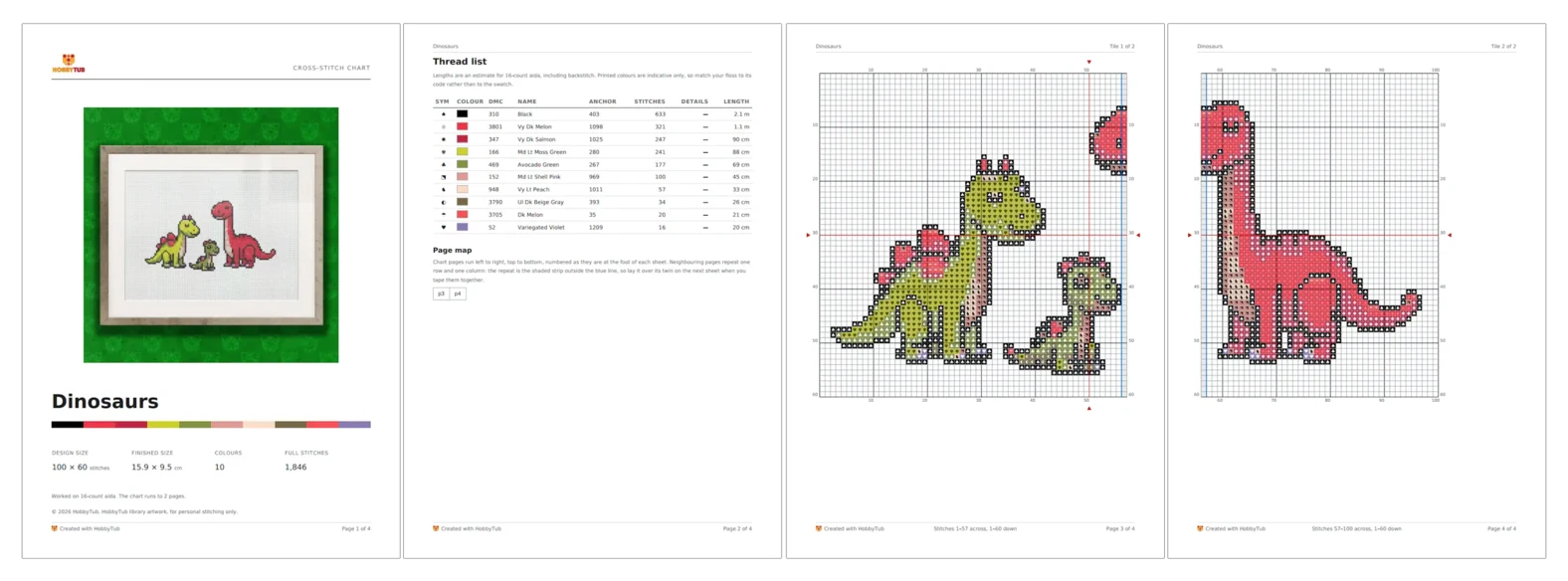
- The exported PDF is built as a chart. Backstitch drawn as lines along cell edges, French knots as circles, beads as ellipses, a cover page, and a legend carrying two thread brands side by side. On a chart you designed, the cover carries your own name, logo and copyright notice.
- Text stays editable, so a name or date on a sampler can be changed later rather than unpicked.
- A library design is yours to change, which a bought chart is not. Add a name or a date, swap a shade for a thread you already own, or change any part of it you would have done differently, then stitch it.
- The same account does the other jobs too, so a photo conversion, an imported PAT file and a library design all end up in one place with one way of marking them off.
Where it is not
- It is a subscription, and several competent tools are free. If you convert one photo a year, a free tool or a per-pattern purchase is better value and we would say so.
- Pattern Keeper is more established for pure chart markup, with a larger community and years of refinement on that single job.
- For marking off alone, it costs more. Markup R-XP does that job for a fraction of our price, part stitches included, and on Apple devices Stitchwork does it for a single payment with a floss stash thrown in. If you already own every chart you want to stitch, one of those is the better buy and we would rather say so than pretend otherwise.
- There is no app store download. You add it to your home screen instead, which some people prefer and some do not.
- Library artwork cannot be exported. You can stitch and track any pattern in the library, but PDF and OXS export covers charts you created or imported yourself.
A sensible way to decide
Work out which of the five jobs you actually need, then try two tools on the same task. Convert the same photo, or mark off the same chart, and see which one you reach for again.
If you want to try ours, all the tools are here, or read about the pattern tracker if marking off is your main interest.