
How to Keep a Cross Stitch Project Journal
Three months into a large piece, the questions are always the same. Which green did I use instead of the one on the chart, how many skeins of it did I buy, and what exactly was I in the middle of when I put it down. The chart cannot answer any of them, because none of it is on the chart.
A project journal is simply a record of what happened while you stitched. Short entries, dated, kept with the piece. It costs seconds an evening, and it is the difference between picking a project back up and starting it again.
What is worth writing down
You do not need an entry for every session, and a journal that feels like homework is abandoned within a fortnight. What earns its place is anything you will not be able to work out later by looking at the fabric.
- Changes you made. A colour swapped for one you already owned, a motif shifted to fit the fabric, backstitch left until the end.
- Threads. Which shade ran out, how many skeins you bought, and whether the new ones came from a different dye lot.
- Materials. The fabric count and colour, the hoop or frame, the needle, how many strands. You will want all of it if you ever stitch the design again.
- Where you stopped. Not the stitch count, which the chart already knows, but what you were in the middle of.
- Mistakes. What you unpicked and why, so it does not happen twice.
- Who it is for, and the date it has to be done by, which is the one thing a journal is ever urgent about.
Write down the thread, not just the date
The entries people regret not writing are almost always about thread. Dye lots vary between batches of the same shade number, so a skein bought six months later can sit slightly differently against the one beside it. Note which colours you topped up and when, and a patch that looks odd in a year has an explanation instead of being a mystery.
The same goes for substitutions. If a chart calls for DMC and you used an Anchor skein you already had, write down both numbers. Nothing on the finished piece will tell you later, and neither will the chart. There is more on keeping the underlying record straight in how to keep track of your thread stash.
When to write an entry
Two moments are worth turning into a habit.
When you stop. One line before you put the work away saves ten minutes of staring at the chart next time. Which motif you were on, which way you were working, what you were about to start.
When something is not routine. A colour ran out, you unpicked an hour's work, you changed the fabric, the person it is for told you how they want it framed. Ordinary evenings need nothing. The unusual ones are exactly what you will have forgotten.
Notebook, phone, or kept with the project
A paper notebook is the traditional answer and by far the pleasantest to write in. Its weakness is that it is somewhere else: not in the project bag when you need it, and not searchable when you have eleven projects and cannot remember which one you noted that shade in.
Your phone's notes app is always with you, which solves half the problem. The other half is that the note sits nowhere near the project, so a year later you have one called "green one" and no idea which piece it belongs to.
Kept with the project itself is the version that survives. If the notes live where the chart and the progress live, you cannot lose one without losing the other, and there is no step where you have to remember to match them up.
What to write when you put a piece away
Not every project that stops is abandoned. Plenty are set aside for a deadline, for a season, or because a section has become tedious, and most of them are picked up again. What decides whether that goes well is the entry you wrote on the way out.
It is worth making that one longer than the rest, because you are writing to a stranger. Say what is done and what is not, which threads are in the bag and which need buying, anything that was going wrong, and the reason you stopped. If the reason was boredom, say so: it tells you what to tackle first when you come back.
It also helps to keep set aside and finished pieces somewhere other than your list of live projects. A list of twenty where three are actually on a hoop is a list you stop reading.
Looking back at a finished piece
A journal earns most of its keep while a project is running, but it pays again at the end. How long a piece takes is a question every stitcher is asked and few can answer, and a dated record answers it. It also shows how much thread a design of that size really used, which makes buying for the next one easier.
And when a finished piece goes into a frame or up on a wall, the record of how it was made is what turns it from a thing you have into a thing you did. There is more on that stage in finishing and framing cross stitch and ways to display cross stitch.
Where HobbyTub fits
Every project in HobbyTub has a journal built in. Entries are dated and kept newest first, with the project rather than in a separate app, and each one saves as you write it, so there is nothing to submit at the end and nothing to lose by closing it.
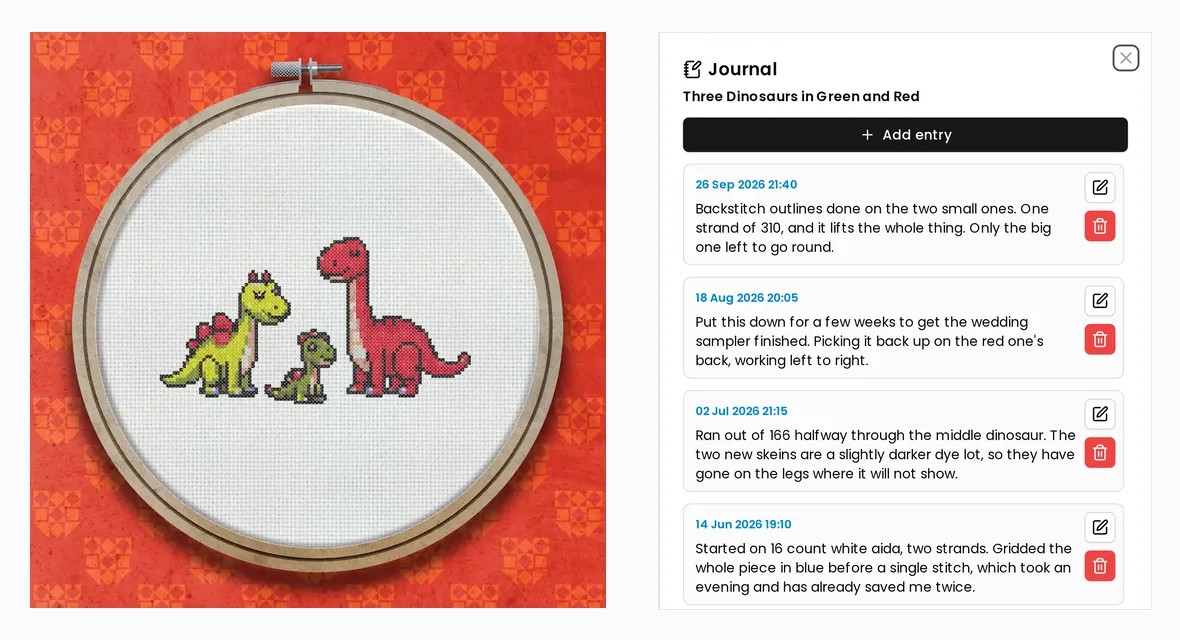
It opens from three places, because the moment you want to note something is rarely the moment you are looking at a list of projects. While you are stitching it is a button in the project toolbar next to Settings. On your dashboard it is in each project's menu, which is how you reread a finished piece without opening it. And the project's Info and notes tab shows how many entries there are and the most recent one, with the rest a click away.
When a piece comes off the hoop, mark it finished and it moves to your Archive. The same action covers a piece you have set aside part done, and the card says which: Finished at 100 per cent, Set aside below it. Nothing else about the project changes, and putting it back on the hoop is one tap from the same menu.
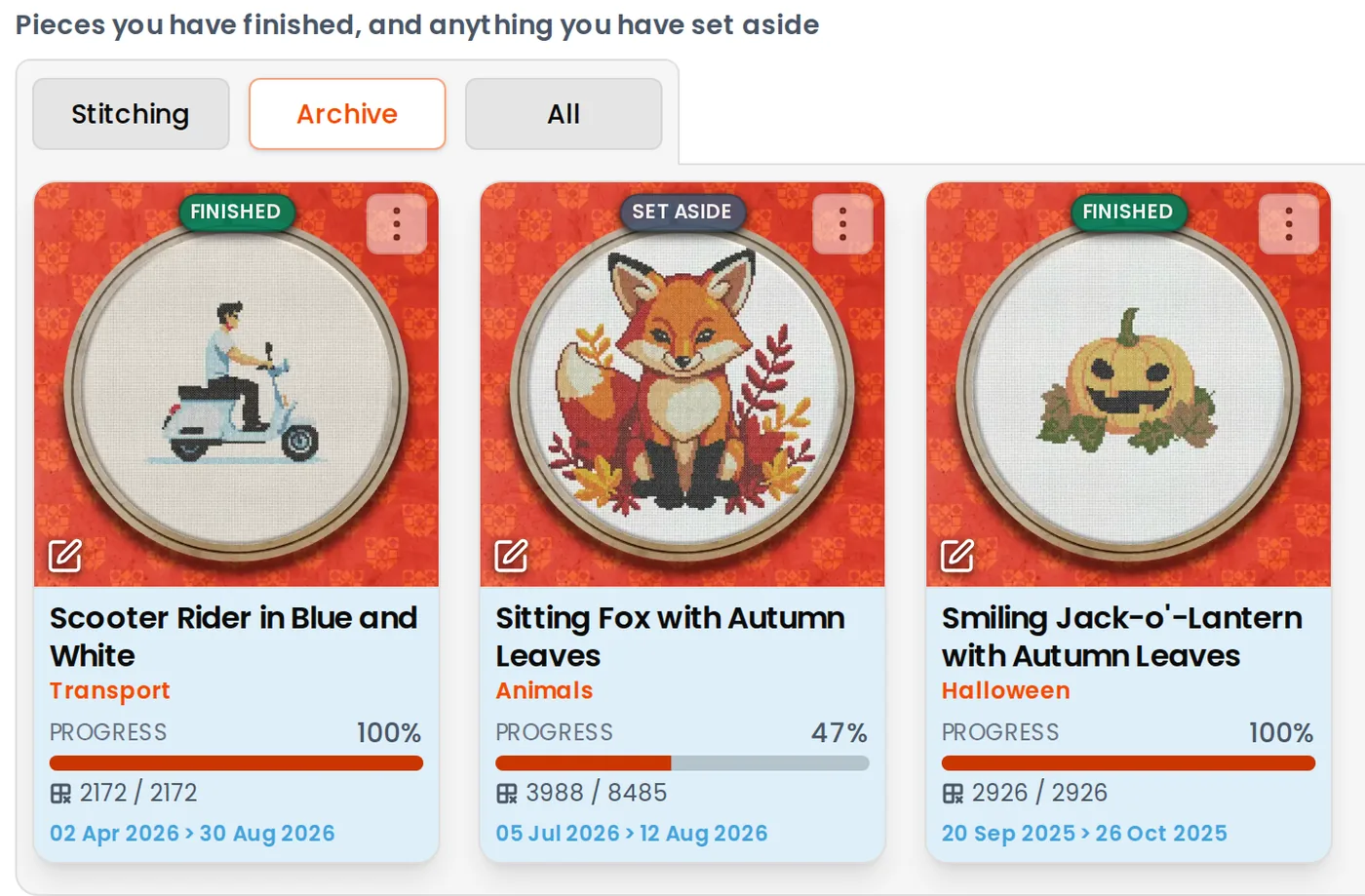
What is left on your dashboard is then what you are actually stitching, with everything else a tab away, plus a search box and a choice of orders for when a piece needs finding.
One honest limitation: the journal needs a connection. Marking off stitches carries on working offline, but reading and writing entries does not, and everything you wrote is there when you reconnect.
There is more on how it works in the project journal guide.