
Confetti Stitches: Why Photo Patterns Get Messy, and How to Tame Them
Ask a room of stitchers what puts them off a chart and someone will say confetti. It is the affectionate name for single stitches scattered one at a time across the design, each in a different colour, each needing its own thread. A pattern full of it turns a relaxing evening into an exercise in constant rethreading.
It is worth understanding, because confetti is not random bad luck. It is a predictable consequence of how patterns get made.
What confetti actually is
In a well-behaved chart, colours arrive in patches. You thread one shade, work a region, and move on. In a confetti-heavy chart, a single square of colour sits alone surrounded by three or four other shades, over and over.
The cost is not the stitch itself. It is everything around the stitch: finding the symbol, matching the colour, starting the thread, working one cross, finishing the thread securely. A single stitch can easily take twenty times as long as one worked inside a block.
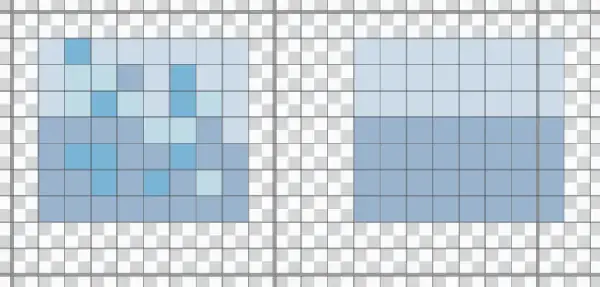
The same patch of sky, charted twice. On the left, five shades scattered stitch by stitch, with a thread change every few stitches. On the right, two shades in blocks. From a distance they read the same, and the left one takes several times longer to work.
Why photo conversions produce so much of it
A photograph is continuous. Skin is not one pink, it is thousands of subtly different pinks blending into each other. Grass is not green, it is hundreds of greens.
When conversion software maps that onto a grid with a limited palette, adjacent pixels that were almost identical can land on different threads. The result looks smooth from a distance, which is why the preview seems fine, but up close the chart is a fine speckle.
This gets worse when:
- The colour count is high. More shades means more chances for neighbouring squares to differ.
- The design is small. Fewer stitches to represent the same detail forces more change per square.
- The photo is busy. Texture, noise and out-of-focus backgrounds all convert into speckle.
- The photo is low quality. Compression artefacts become stitches, faithfully.
Reducing it before you convert
Prevention beats cure by a wide margin, and the biggest wins happen before the chart exists.
Cut the colour count. This is the single most effective lever. Going from sixty shades to twenty-five will not usually cost you much visually, and it transforms the stitching experience. Look at the preview as you reduce and stop one step before it starts to lose something you care about.
Remove the background. A busy background is a confetti factory, and it spends your palette on the least interesting part of the picture. Stripping it out first concentrates the colours where the detail matters. The pattern maker can do this in one click before converting.
Go bigger. More stitches gives the software room to represent a gradient as a gradient rather than as alternating specks. If a design is coming out speckled, increasing the stitch count often helps more than changing anything else.
Pick a better source photo. Good light, a clear subject and real contrast convert far more cleanly than a dim or cluttered image. There is more on this in how to turn a photo into a cross stitch pattern.
Cleaning it up in the editor
Some confetti will survive whatever you do, and that is where editing earns its keep.
Open the chart in a pattern editor and look for isolated stitches sitting alone in a field of another colour. In most cases you can simply absorb them into the surrounding shade. Nobody looking at the finished piece will notice one stitch changed, and you have saved a thread change.
Pay attention to where the detail genuinely matters. A single light stitch in an eye can be the thing that makes a portrait work, so keep that. A single slightly different green in a hedge is noise, so lose it.
Living with the confetti that remains
Some designs are worth stitching despite it. Two techniques make it bearable.
Parking. Rather than finishing a thread after one stitch, bring the needle up where that colour is next needed and leave it parked there. You work with several threaded needles at once, and you stop starting and finishing constantly. It takes a little getting used to and then it is transformative on a confetti-heavy piece.
Cross country. Work one colour across a whole area before moving on, carrying the thread short distances behind the work. Combined with neat starts and finishes this keeps the back tidy while cutting thread changes.
Judge the chart, not the preview
The habit worth building is simple: before committing to a photo pattern, look at the chart rather than the picture of the finished piece. Are there areas of solid colour to settle into? Or is the whole thing a fine mist of alternating symbols?
That one look will tell you more about the next forty hours than the preview ever will.
You can convert a photo and inspect the chart before you buy any thread, or browse the pattern library for designs drawn to be stitched rather than converted from a photograph.