
How to Open a PAT or XSD File Without the Original Software
Sooner or later a stitcher inherits a folder. A memory stick from a friend clearing out, charts bought a decade ago, a collection that came with a secondhand laptop. Inside are files ending in .pat or .xsd and nothing on your computer will open them.
The good news is that the patterns are not lost, and you do not need to buy anything to read them.
Why these files exist
Both formats come from desktop charting programs. PCStitch produces .pat, Pattern Maker produces .xsd. Both were the standard tools for years, so a great deal of the charts in circulation are in one or the other.
Unlike a PDF, these hold the actual pattern data: which thread goes in which square, the backstitch lines, the knots and beads, and the full palette. That is why they are worth recovering rather than replacing. There is more on the distinction in cross stitch pattern file formats.
What usually goes wrong
Nothing opens the file. Double-clicking does nothing, or the system offers to search an app store. Neither format has a default handler on a modern machine.
The original program will not install. Older releases were built for much earlier versions of Windows, and there is often no macOS build at all.
A generic converter fails. Some online converters claim to handle .xsd and return an empty grid. That is usually the encryption wrinkle: some Pattern Maker versions store the stitch grid in an encrypted form, and a tool either handles that or quietly gives you nothing.
You open the wrong .xsd. The extension is also used by a completely unrelated web standard, so searching for help turns up a lot of material about XML schemas. Ignore it.
Opening them in a browser
The straightforward route now is a browser-based converter, which decodes the file without needing the original program installed.
The process is short:
- Upload the
.pat,.xsdor.oxsfile. - The chart appears with its palette, dimensions and stitch counts.
- Check it looks right, particularly that backstitch, knots and any fractional stitches came across rather than only whole squares.
- Export what you need: a printable PDF to stitch from, or OXS to keep as a durable copy.
HobbyTub does this in the pattern converter, including the encrypted Pattern Maker variant that catches most tools out.
What to check once it opens
A file can decode and still be subtly wrong, so it is worth a quick look before you trust it.
- Dimensions. Does the stitch count match what the designer stated, if you know it?
- Colour count. A chart that suddenly has four colours when it should have thirty has not decoded properly.
- Backstitch and knots. These are the first things a partial decoder drops. If the design should have outlines and they are missing, the import is incomplete.
- Fractional stitches. The quieter loss, and the one worth looking for on a curve. A converter that rounds every split square up into a whole one produces a chart that looks complete and stitches blockier than the designer drew it. Zoom into a curved edge and check the squares are still split.
- The palette. Thread numbers should be recognisable brand codes rather than arbitrary colours.
Converting to something durable
Once it is open, this is the moment to future-proof it.
Export to OXS. It is plain XML, it is an open format specifically for this purpose, and it carries stitches, fractional stitches, backstitch, knots and beads. A chart saved as OXS will still be readable long after the program that made it has stopped running anywhere.
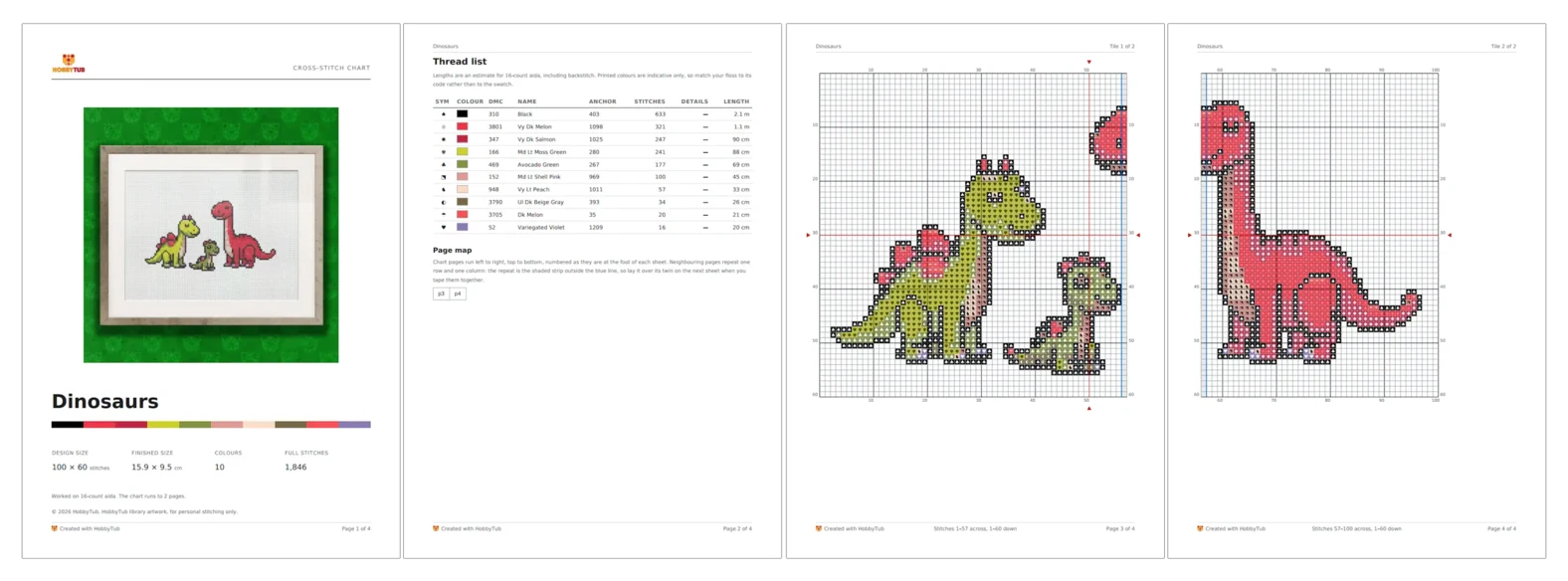
Export a PDF as well, for actually stitching from. A good chart PDF tiles the design across pages at a readable scale, numbers the rows and columns on all four edges, and prints backstitch as lines along the cell edges rather than approximating it.
Keep the original file too. It costs nothing and it is the most complete record you have.
What about PDFs you want as data?
The reverse direction comes up a lot: you have a PDF chart and want it as a pattern you can recolour or track stitch by stitch.
This is genuinely harder, because a PDF is a picture rather than data, and the software has to recognise the grid and the symbols. It works best on PDFs exported cleanly from charting software, where the symbols are crisp vectors. It works poorly on scans, photographs of a page, or heavily compressed files.
Import what you can, then expect to spend a little time in the pattern editor correcting anything the recognition got wrong.
A word on ownership
Being able to open a file does not change who owns the design. Converting a chart you bought, so you can stitch it on a device you own, is ordinary personal use. Passing the converted file around is redistributing someone else's work, and most cross stitch designers are one person selling small patterns.
Recover your own collection freely. Just do not turn it into someone else's collection.
You can open a chart file in the browser with nothing to install, then mark it off as you stitch on any device, or see all the tools if you want to edit what you recover.